Documentation

Write data to InfluxDB

Use Chronograf to write data to InfluxDB. Choose from the following methods:

Upload line protocol through the Chronograf UI

  1. Select Explore in the left navigation bar.

  2. Click Write Data in the top right corner of the Data Explorer.

    Write data to InfluxDB with Chronograf
  3. Select the database (if an InfluxQL data source is selected) or database and retention policy (if a Flux data source is selected) to write to.
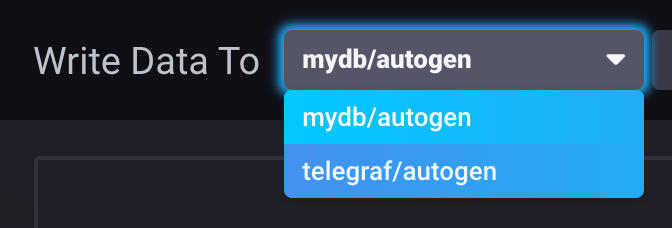
    Select database and retention policy to write to
  4. Select one of the following methods for uploading line protocol:

    • Upload File: Upload a file containing line protocol to write to InfluxDB. Either drag and drop a file into the file uploader or click to use your operating systems file selector and choose a file to upload.
    • Manual Entry: Manually enter line protocol to write to InfluxDB.
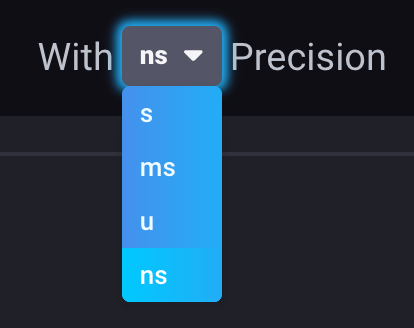
  5. Select the timestamp precision of your line protocol. Chronograf supports the following units:

    • s (seconds)
    • ms (milliseconds)
    • u (microseconds)
    • ns (nanoseconds)
    Select write precision in Chronograf
  6. Click Write.

Use the InfluxQL INTO clause in a query

To write data back to InfluxDB with an InfluxQL query, include the INTO clause in your query:

  1. Select Explore in the left navigation bar.

  2. Select InfluxQL as your data source type.

  3. Write an InfluxQL query that includes the INTO clause. Specify the database, retention policy, and measurement to write to. For example:

    SELECT *
    INTO "mydb"."autogen"."example-measurement"
    FROM "example-db"."example-rp"."example-measurement"
    GROUP BY *
  4. Click Submit Query.

Use InfluxQL to write to InfluxDB 2.x or InfluxDB Cloud

To use InfluxQL to write to an InfluxDB 2.x or InfluxDB Cloud instance, configure database and retention policy mappings and ensure the current InfluxDB connection includes the appropriate connection credentials.

Use the Flux to() function in a query

To write data back to InfluxDB with an InfluxQL query, include the INTO clause in your query:

  1. Select Explore in the left navigation bar.

  2. Select Flux as your data source type.

    To query InfluxDB with Flux, enable Flux in your InfluxDB configuration.

  3. Write an Flux query that includes the to() function. Provide the database and retention policy to write to. Use the db-name/rp-name syntax:

    from(bucket: "example-db/example-rp")
      |> range(start: -30d)
      |> filter(fn: (r) => r._measurement == "example-measurement")
      |> to(bucket: "mydb/autogen")
  4. Click Run Script.


Was this page helpful?

Thank you for your feedback!


InfluxDB OSS 2.9.0: API tokens are hashed by default

Stronger token security in InfluxDB OSS 2.9.0 — tokens are hashed on disk by default. Existing tokens are hashed on first startup and can’t be recovered afterward. Capture any plaintext tokens you still need before you upgrade.

View InfluxDB OSS 2.9.0 release notes

Hashed tokens authenticate exactly like unhashed tokens — clients and integrations keep working.

Also new in 2.9.0:

  • Configurable backup compression
  • Restore support for backups containing hashed tokens
  • Tighter Edge Data Replication queue validation
  • Flux upgrade
  • Compaction reliability improvements

Key enhancements in Explorer 1.8

Explorer 1.8 is now available with streaming data subscriptions (beta), line protocol preview, and query history & saved queries.

View Explorer 1.8 release notes

Explorer 1.8 includes new features and improvements that make it easier to ingest, explore, and manage data.

Highlights:

  • Streaming data subscriptions (beta): Stream data into Explorer from MQTT, Kafka, and AMQP sources.
  • Line protocol preview: Preview line protocol, schema, and parse errors before data is written.
  • Custom sample data: Generate custom sample datasets with line protocol and schema preview.
  • Query history and saved queries: Browse query history and save/re-run named queries.
  • Retention period management: Set, update, or clear retention periods on databases and tables.

For more details, see Explorer 1.8 release notes

InfluxDB 3.10 is now available

InfluxDB 3 Core 3.10 adds an automatic catalog format upgrade, a configurable query-concurrency limit, and processing engine improvements.

Key updates in InfluxDB 3 Core 3.10:

  • Catalog format upgrade: the on-disk catalog automatically upgrades from format v2 to v3 on first 3.10 startup. Migration is one-way—back up your catalog before upgrading.
  • --max-concurrent-queries: limit concurrent queries (adjustable at runtime).
  • GET /ready endpoint for readiness probes.
  • Processing engine: cross-database queries and trigger lockdown flags.

For more information, see the InfluxDB 3 Core release notes.

InfluxDB 3.10 is now available

InfluxDB 3 Enterprise 3.10 adds automated backup and restore, row-level deletions, and user management, with an automatic catalog format upgrade and performance preview improvements.

Key updates in InfluxDB 3 Enterprise 3.10:

  • Catalog format upgrade: the on-disk catalog automatically upgrades from format v2 to v3 on first 3.10 startup. Migration is one-way—back up your catalog before upgrading.
  • Automated backup and restore (beta)
  • Row-level deletions
  • User management (authentication and RBAC) — preview
  • Performance preview improvements

Backup and restore, row-level deletions, and the performance preview require the Enterprise storage engine upgrade (opt-in beta). Beta and preview features are subject to breaking changes and aren’t recommended for production use.

For more information, see the InfluxDB 3 Enterprise release notes

Telegraf Enterprise now in public beta

Get early access to the Telegraf Controller and provide feedback to help shape the future of Telegraf Enterprise.

See the Blog Post

The upcoming Telegraf Enterprise offering is for organizations running Telegraf at scale and is comprised of two key components:

  • Telegraf Controller: A control plane (UI + API) that centralizes Telegraf configuration management and agent health visibility.
  • Telegraf Enterprise Support: Official support for Telegraf Controller and Telegraf plugins.

Join the Telegraf Enterprise beta to get early access to the Telegraf Controller and provide feedback to help shape the future of Telegraf Enterprise.

For more information:

Telegraf Controller v0.0.7-beta now available

Telegraf Controller v0.0.7-beta is now available with new features, improvements, bug fixes, and an important breaking change.

View the release notes
Download Telegraf Controller v0.0.7-beta

InfluxDB Docker latest tag changing to InfluxDB 3 Core

On September 15, 2026, the latest tag for InfluxDB Docker images will point to InfluxDB 3 Core. To avoid unexpected upgrades, use specific version tags in your Docker deployments.

If using Docker to install and run InfluxDB, the latest tag will point to InfluxDB 3 Core. To avoid unexpected upgrades, use specific version tags in your Docker deployments. For example, if using Docker to run InfluxDB v2, replace the latest version tag with a specific version tag in your Docker pull command–for example:

docker pull influxdb:2